


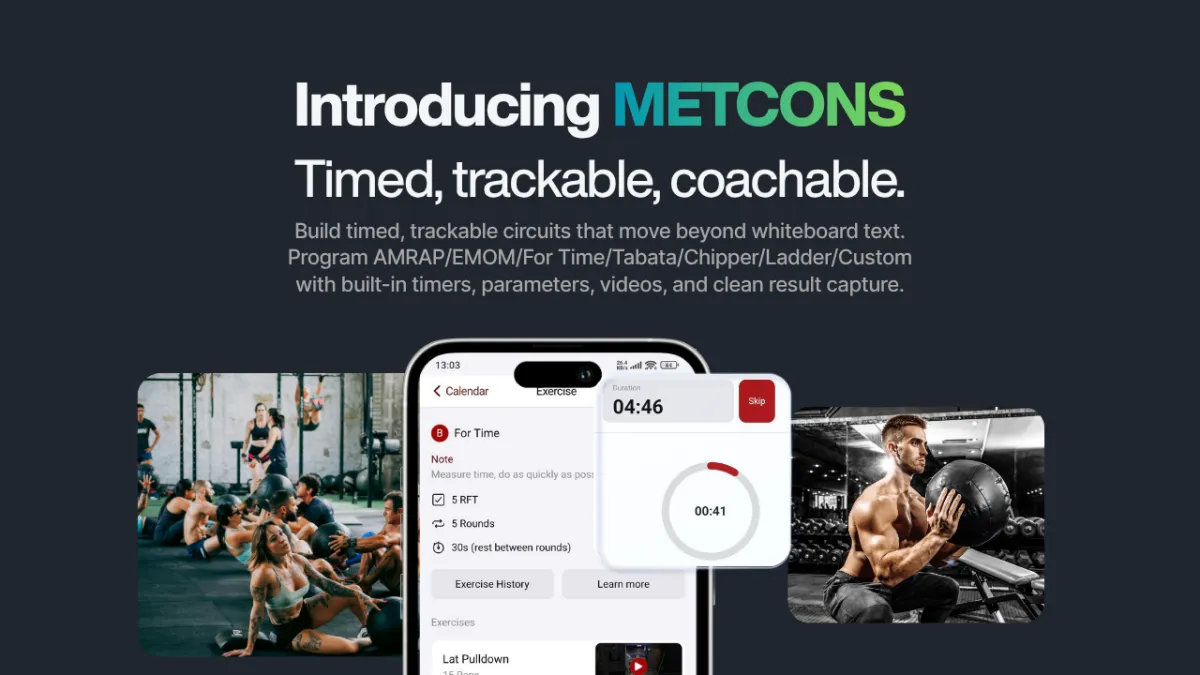
How to build metcons in MyStrengthBook
Introducing METCONS
⭐ Most “Metcon” tools are just text boxes. MyStrengthBook METCONS are structured, timer-aware, parameterized, and tracked. Every rep, load, and second is tied to an exercise from your master library, with videos shown automatically and results captured in a format that’s actually coachable.
🖥️How-To (Desktop)
📌 Create a new METCON
Open the Metcons builder.
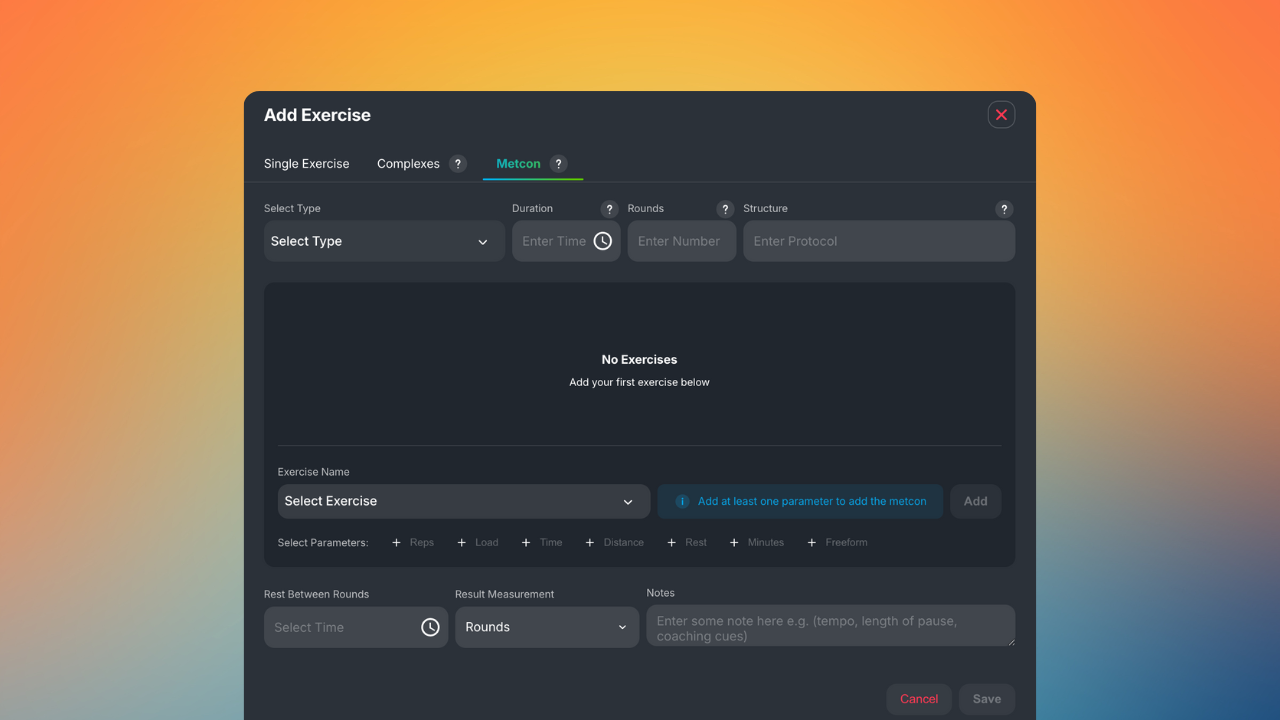
Select Type: choose one — AMRAP, EMOM, For time, Tabata, Chipper, Ladder, or Custom. This drives timer behavior and how results make sense.
Duration: set total time or time cap (e.g.,
10:00,20:00)Rounds: number of rounds/sets (useful for EMOM/Tabata/Ladder; optional for AMRAP/For time depending on design)
Structure: pick the protocol label you want athletes to follow (e.g., AMRAP, EMOM, For time). This clarifies intent in the athlete view.
🏃♂️ Add exercises & parameters
Select Exercise: choose from your master exercise library (search by name)
Select Parameters: pick one or more. At least 1 is required.
Reps (e.g.,
12)Load (e.g.,
24/16 kg)Time (e.g.,
:45)Distance (e.g.,
200 m)Rest (movement-level rest, if needed)
Minutes (useful for minute-based prescriptions)
Free form (for uncommon prescriptions or cues)
Videos: if the exercise in your library has a video, it will auto-display to the athlete.
💡 Parameter tips
Use Load with male/female notation directly in the field:
24/16 kgUse Distance for erg/running/rower/ski/bike work (
500 m,1 km)Use Time for isometrics or on-off intervals (
:30 hold)Use Free form to capture odd prescriptions (e.g., “as heavy as possible”)
⚡ Global pacing & result capture
Rest Between Rounds: pick a time value (e.g.,
1:00) if the protocol benefits from a global rest.EMOM typically doesn’t need global rest (rest is inside each minute)
Result Measurement: choose how you want results recorded: Time, Rounds, Other.
For time: choose Time.
AMRAP/EMOM: choose Rounds (or Other if you want total reps).
Tabata: often Other (e.g., “best/worst reps”) or Rounds for sets completed.
Chipper/Ladder: Time (race to finish) or Other if you want total reps reported.
🗒️ Notes: add coaching cues, tempo, pauses, scaling notes (e.g., “Tempo 3011; KB swings hinge-dominant; cap at 12 min.”)
💾 Save, publish, and reuse
Save & Publish: athletes see updates after you save & publish.
Edit behavior: edits are visible after saving/publishing again.
Templates: save any metcon as a template and duplicate for future cycles or progressions.
📊 Reviewing results
After publish, athlete entries roll in against your Result Measurement.
Scan for completion vs. cap, round consistency, and rep-quality indicators from Notes.
Tweak prescriptions next week: adjust load, distance, or time cap based on distributions you see.
🆕 New Feature: Custom Names for Metcons
New Feature: Custom Names for Metcons
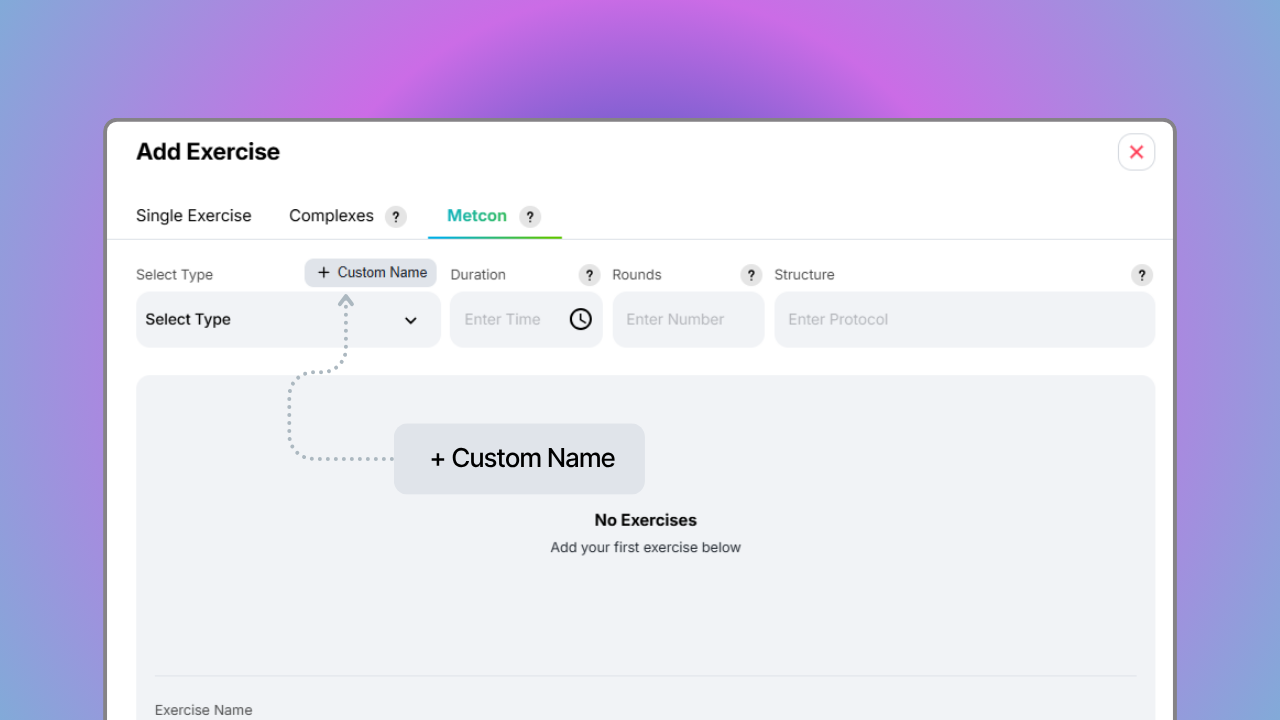
When a Metcon type (like AMRAP or EMOM) is selected, the custom name will concatenate with it — for example:
“AMRAP – Max 10”
If the type is set to “Custom”, only the custom name will appear as the title.
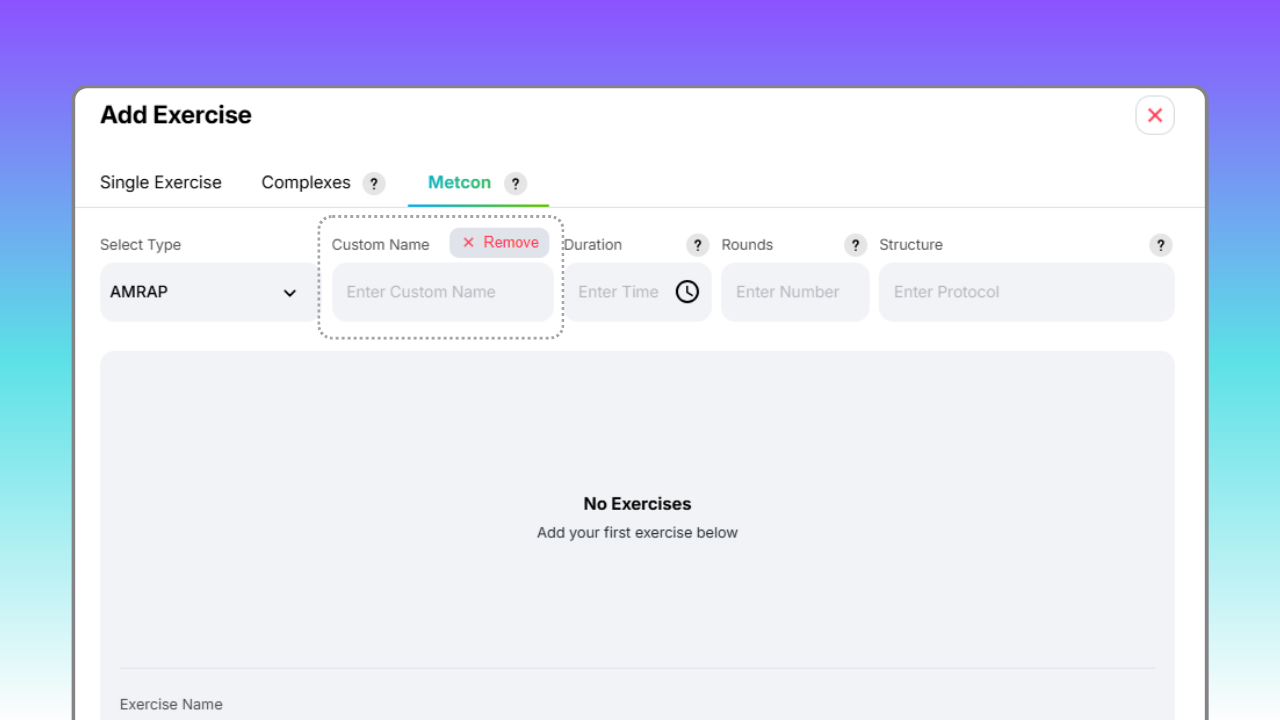
This gives coaches more flexibility in naming and organizing their workouts.
📱How-To (Mobile)
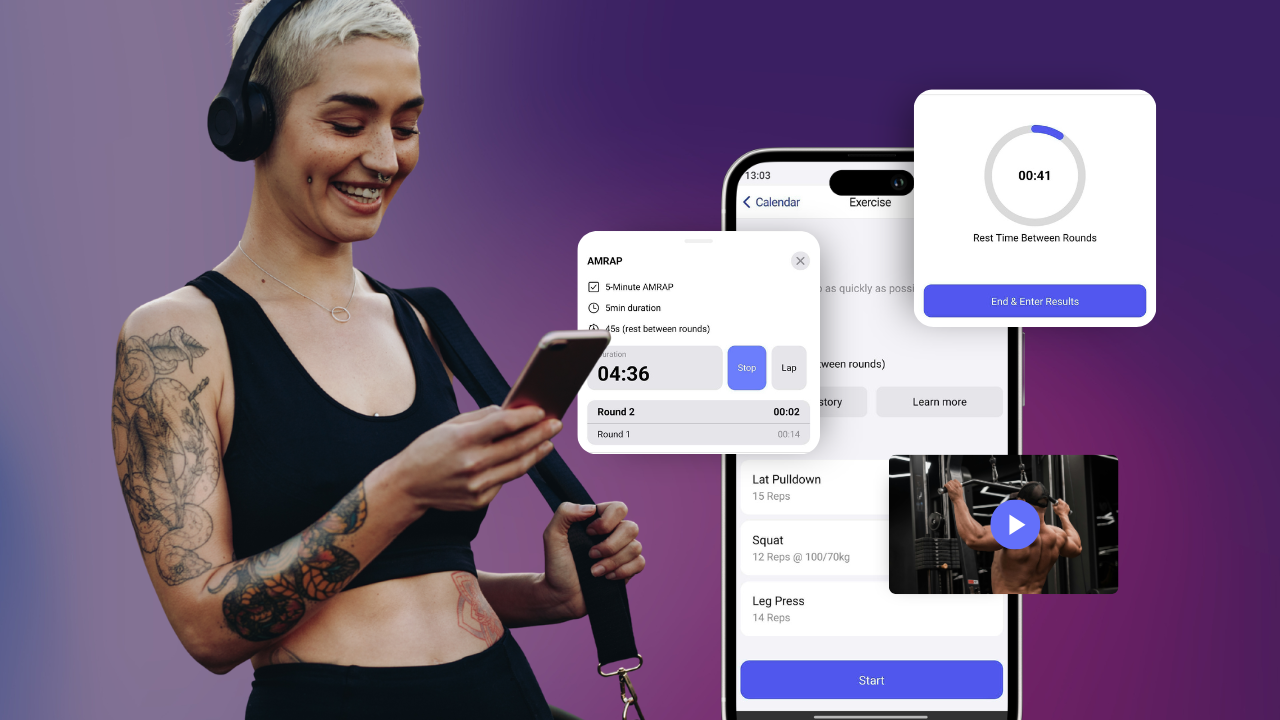
📲Mobile app experience
How it works
Open the workout and skim the header.
You’ll see the workout type (AMRAP, EMOM, For Time, etc.), a short note on how to score, and any settings like duration, rounds, or built-in rest.
The movements are listed with their prescriptions—reps, load, time, or distance.
If you spot a video thumbnail, tap it for a quick demo before you start.
When you’re ready, hit Start.
The timer opens and runs the session. Just follow the movements as written. If your coach programmed rest between rounds, a countdown will show automatically—breathe, reset, and wait for the next round to begin.
If you switch apps or lock your phone during the workout, you’ll see a persistent workout banner/notification at the top of your screen. Tap it to jump straight back into the timer without losing your place.
When you finish, tap End & Enter Results and log your score exactly as requested:
AMRAP / EMOM: enter total rounds plus any extra reps.
For Time / Chipper: enter your total time.
Tabata / Other: enter the specific metric your coach asked for (e.g., lowest reps, total cals).
🗒️ Notes from your coach live right under the title. Things like pacing targets, tempo, or scaling. Keep them in mind while you move.
If something feels off:
No demo video? It just means none was attached. Perform your best version and ask your coach after.
Wrong scoring option showing? Finish the session as best you can and message your coach; updates appear once your coach saves & publishes.
🎁 Programming Examples
Browse real, ready-to-use METCON setups with exact parameters and coach notes.
A) EMOM density (single movement)
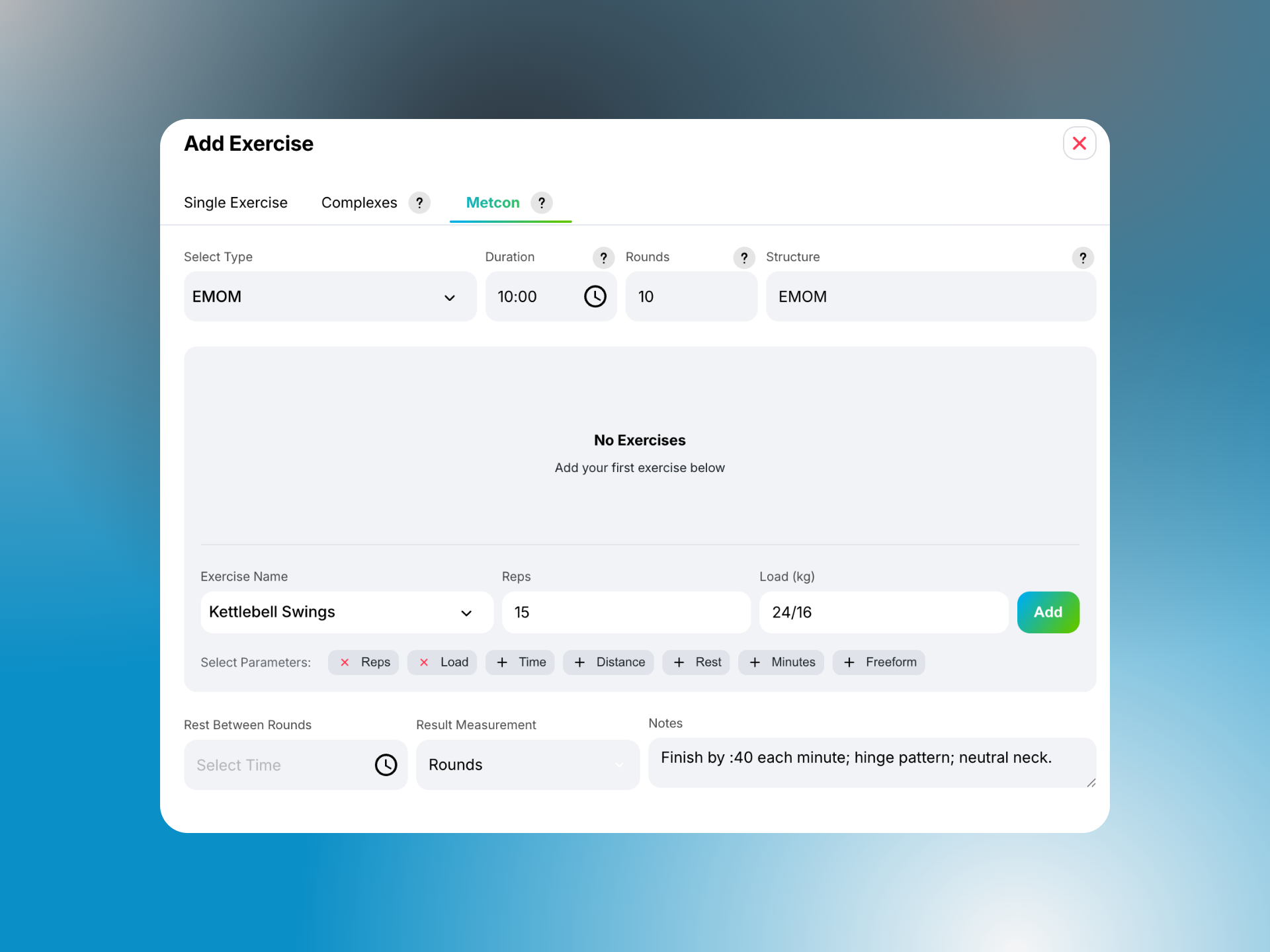
🗒️ Notes: “Finish by :40 each minute; hinge pattern; neutral neck.”
Why: Shows timer-driven density; clean, trackable, minimal friction.
B) AMRAP mixed modal (move + erg)
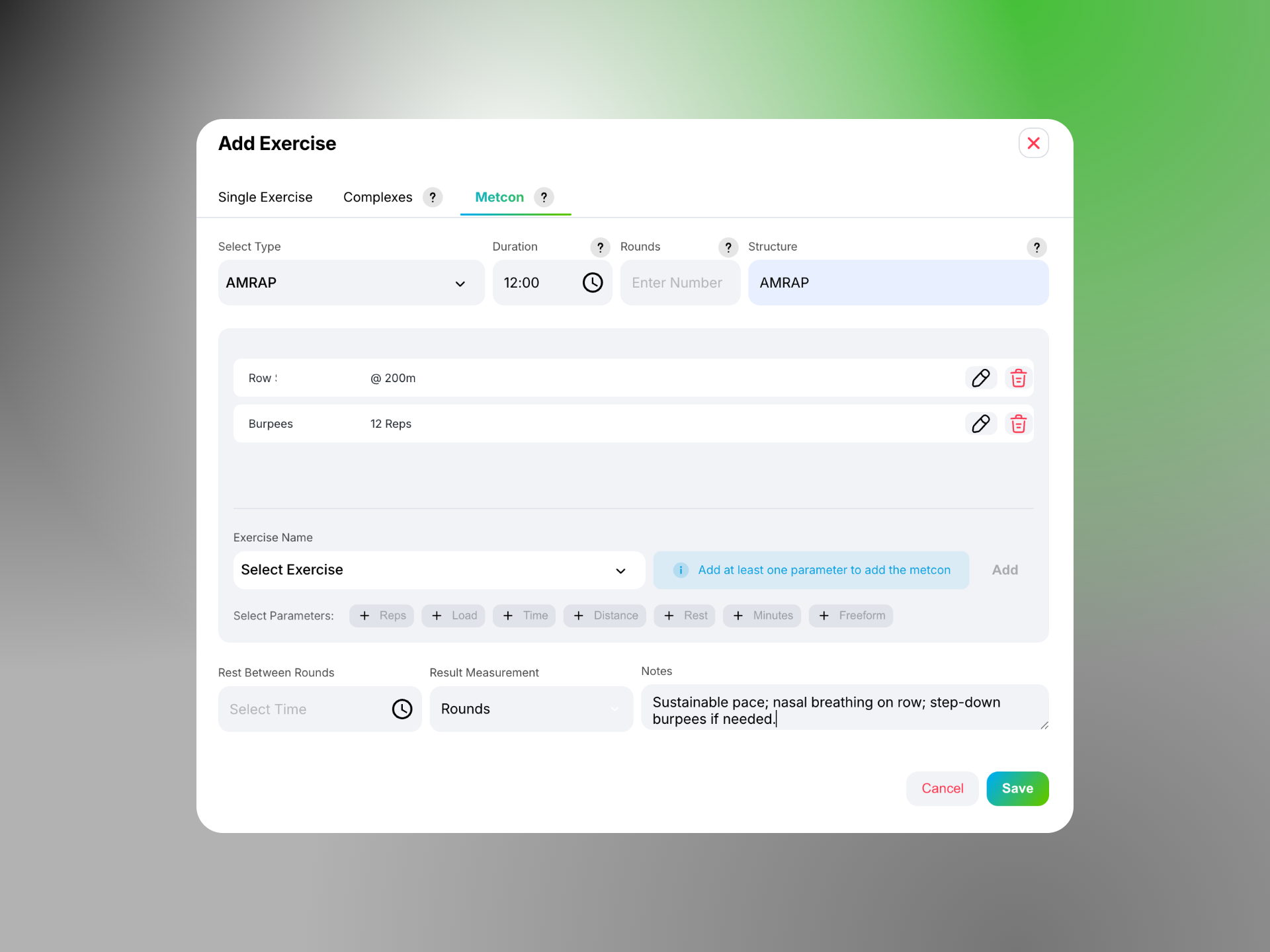
Select Type: AMRAP
Duration:
12:00Rounds: (blank)
Structure: AMRAP
Exercise 1: Row
Parameters:
+ Distance→200 m
Exercise 2: Burpee
Parameters:
+ Reps→12
Rest Between Rounds: (blank)
Result Measurement:
Rounds
🗒️ Notes: “Sustainable pace; nasal breathing on row; step-down burpees if needed.”
Why: Classic couplet; distance + reps; simple to brief and grade.
C) For time couplet (race + cap)
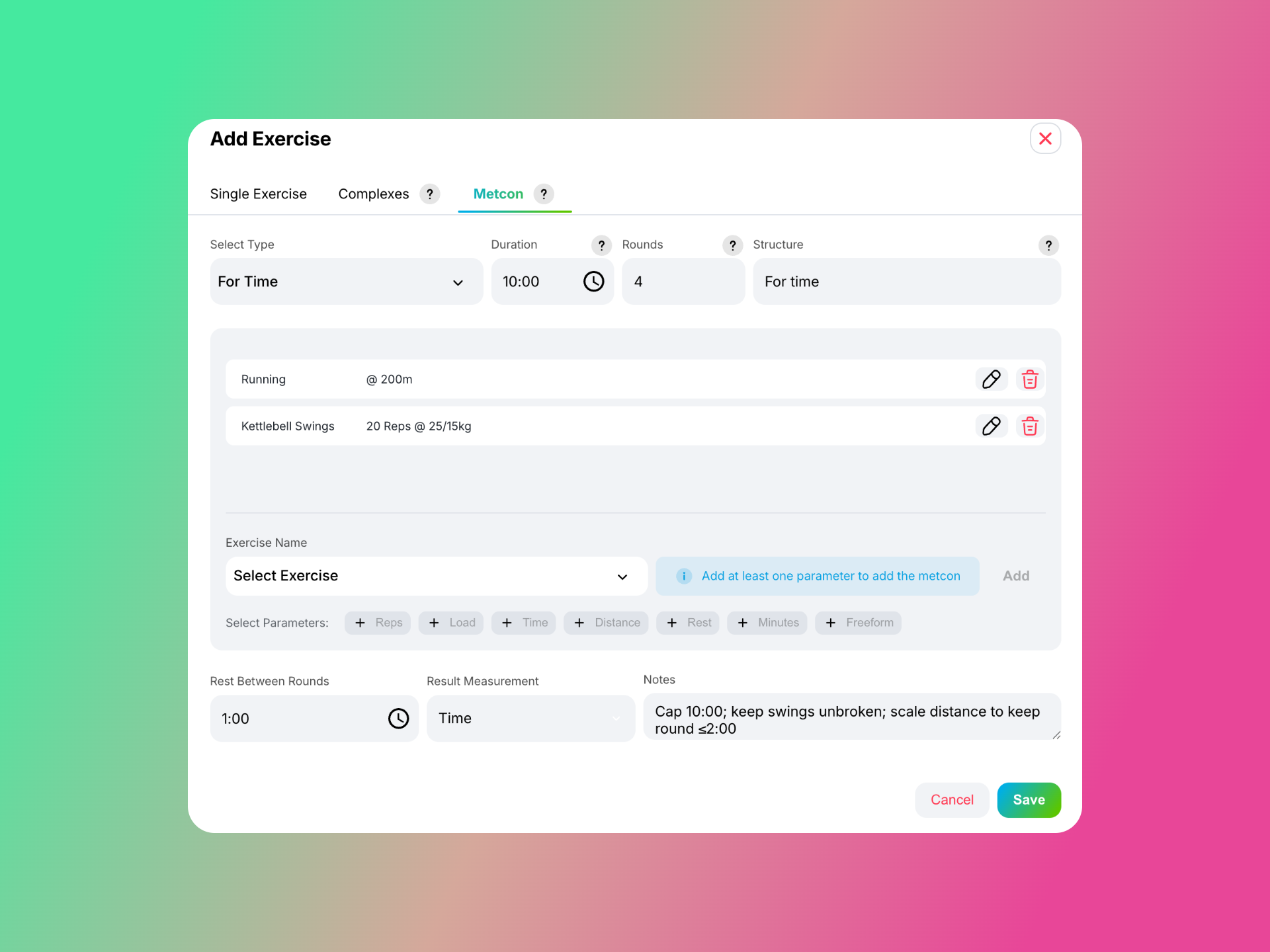
Select Type: For time
Duration (cap):
10:00Rounds:
4Structure: For time
Exercise 1: Run
Parameters:
+ Distance→200 m
Exercise 2: Kettlebell Swing
Parameters:
+ Reps→20;+ Load→24/16 kg
Rest Between Rounds:
1:00Result Measurement:
Time
🗒️Notes: “Cap 10:00; keep swings unbroken; scale distance to keep round ≤2:00.”
Why: Clean target with pacing/rest; athletes submit a single time.
D) Tabata (on-off intervals)
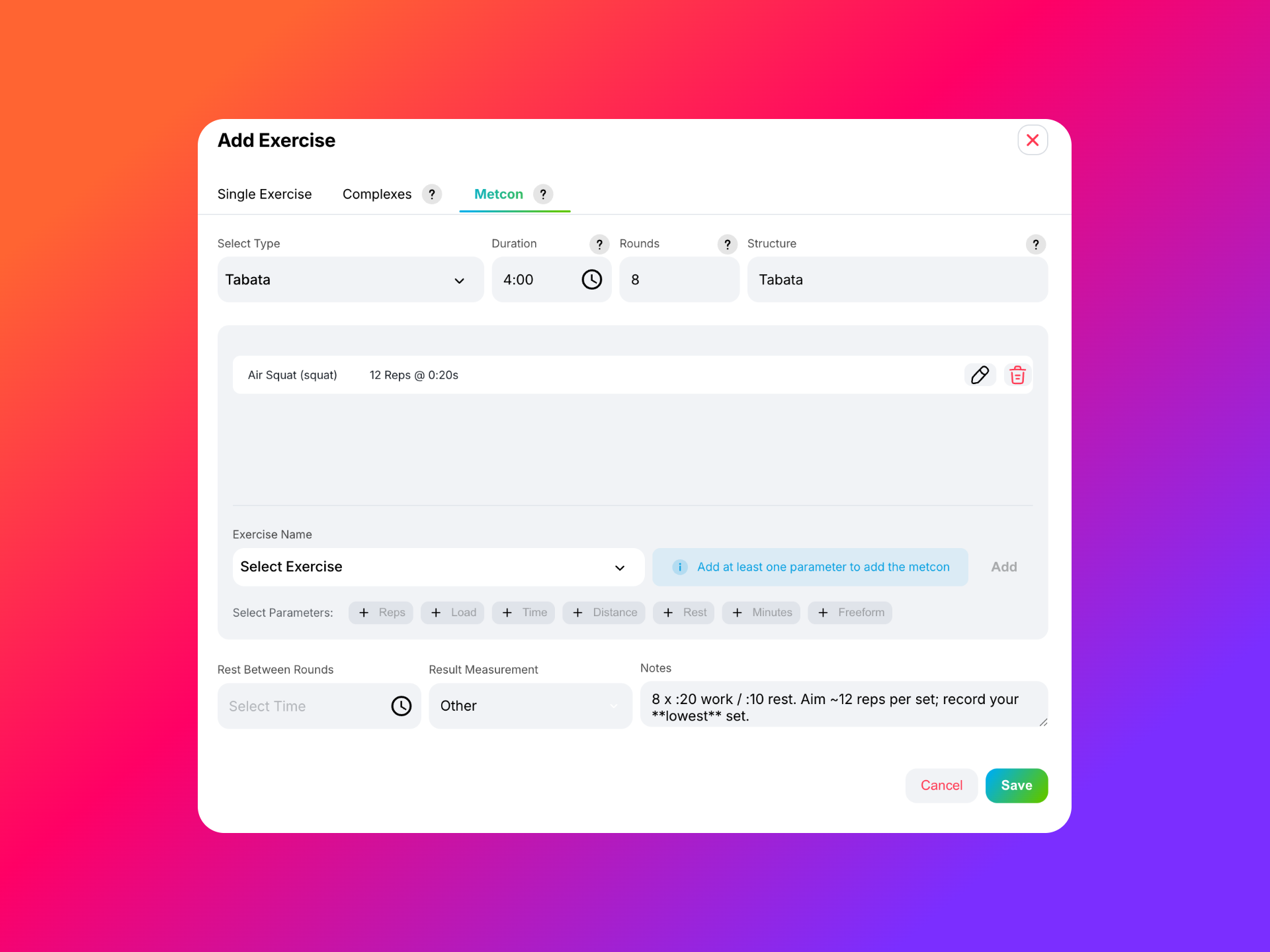
Select Type: Tabata
Duration:
4:00Rounds:
8Structure: Tabata
Exercise: Air Squat → Add
Select Parameters:
+ Reps→ type12(optional) also add
+ Time→ type0:20(some coaches like to show the work window explicitly)
Rest Between Rounds: (leave blank — Tabata has built-in :10 rest)
Result Measurement:
Other(coach note: “record lowest reps”)
🗒️ Notes: 8 x :20 work / :10 rest. Aim ~12 reps per set; record your **lowest** set.
E) Chipper (big list, finish fast)
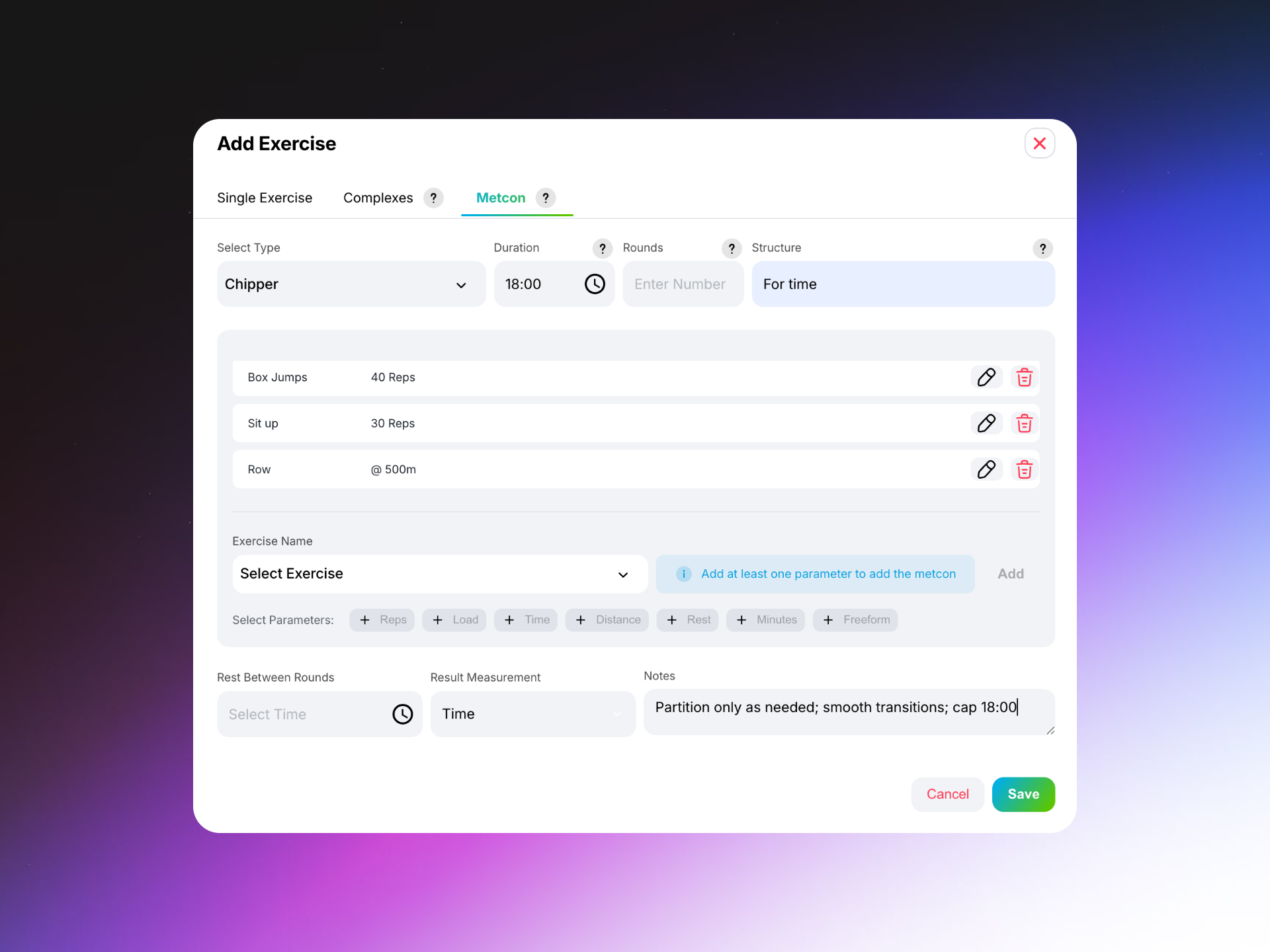
Select Type: Chipper
Duration (cap):
18:00Rounds: (blank)
Structure: For time
Exercise 1: Kettlebell Swing —
+ Reps→50→+ Load→24/16 kgExercise 2: Box Jump —
+ Reps→40Exercise 3: Sit-up —
+ Reps→30Exercise 4: Row —
+ Distance→500 mRest Between Rounds: (blank)
Result Measurement:
Time
🗒️ Notes: “Partition only as needed; smooth transitions; cap 18:00.”
Why: Demonstrates long list sequencing and race logic.
F) Ladder (ascending reps)
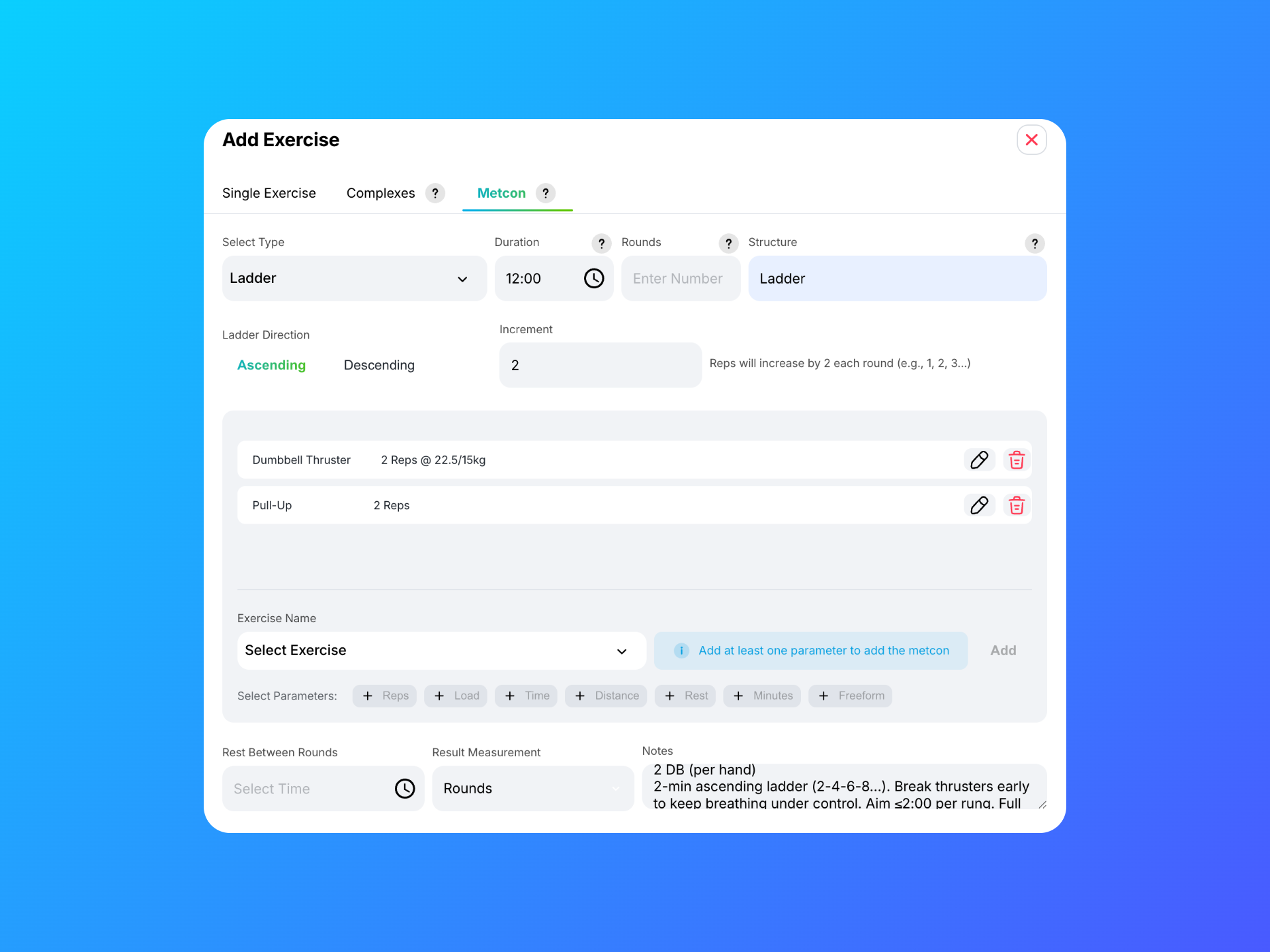
Select Type: Ladder
Duration (cap):
12:00Rounds: (leave blank)
Structure:
LadderLadder Direction:
AscendingIncrement:
2(creates 2-4-6-8…)Exercise 1: Dumbbell Thruster → Add
+ Reps (start):
2+ Load:
22.5/15 kg(Put “2 DB (per hand)” in Notes or use Free form; don’t type
2xin Load.)
Exercise 2: Pull-up → Add
+ Reps (start):
2
Rest Between Rounds: (blank)
Result Measurement:
Rounds(record highest full rung; use next-rung reps as tiebreak if you like)
🗒️ Notes: “12-min ascending ladder (2-4-6-8…). Break thrusters early to keep breathing under control. Aim ≤2:00 per rung. Full ROM on pull-ups; scale to band/ring row if needed. Record highest full rung.”
Alt scoring: If you prefer total reps, set Result Measurement = Other and note: “Enter total reps across both movements.”
G) Custom (anything you need)
Select Type: Custom
Duration: as needed
Rounds: as needed
Structure: Custom description
Add any Exercise(s) with the Parameters that best describe your intent (reps/load/time/distance/rest/minutes/free form).
Result Measurement: choose the outcome that matches your goal.
🗒️ Notes: state exactly how you want athletes to score it.
Why: Catch-all for non-standard circuits or specialty testing.
⭐ Programming best practices
Name the intent in Structure/Notes so athletes instantly get it.
Keep Result Measurement aligned to your goal (race = Time; volume = Rounds/Reps).
Use Load fields for male/female prescriptions (
24/16 kg) to avoid cluttering Notes.Prefer Distance/Time parameters for ergs and holds—cleaner data, better pacing.
Template anything you’ll repeat (e.g., weekly EMOM progressions).
🧩 Troubleshooting & quick fixes
Need to edit a Metcon after programming it?
Edit it directly in the clients calendar using the edit mode
Mixed loads confusing athletes?
Put 24/16 kg in the Load parameter, and any extra scaling in Notes.
EMOM showing too much rest?
Remove Rest Between Rounds; EMOM rest is within the minute.
No video showing?
Add/attach the clip to the exercise in the master library.
Wrong scoring appearing?
Change Result Measurement, save & publish.
📥info@mystrengthbook if you need any help


No email required
More from the blog





Your coaching deserves a smarter engine
Program, track, and analyze every client across training, nutrition, lifestyle, and education. Less admin, more coaching
Explore PULL ›