



How to set up Organizations in MyStrengthBook
What is ORGANIZATIONS:
Imagine having the power to effortlessly manage multiple coaches under your wing, all from within your own account!
With "Organizations" each coach gets their own set of credentials, ensuring a personalized and secure experience.
What's in it for you?
✅ Effortlessly handle multiple coaches under your umbrella
✅ Grant individual login credentials to each coach
✅ Share your custom app, exercise library, and templates with your team members for a turnkey coaching app
✅ Scale your coaching business
✅ Foster teamwork within your organization
And more!
Turning on "Organizations”
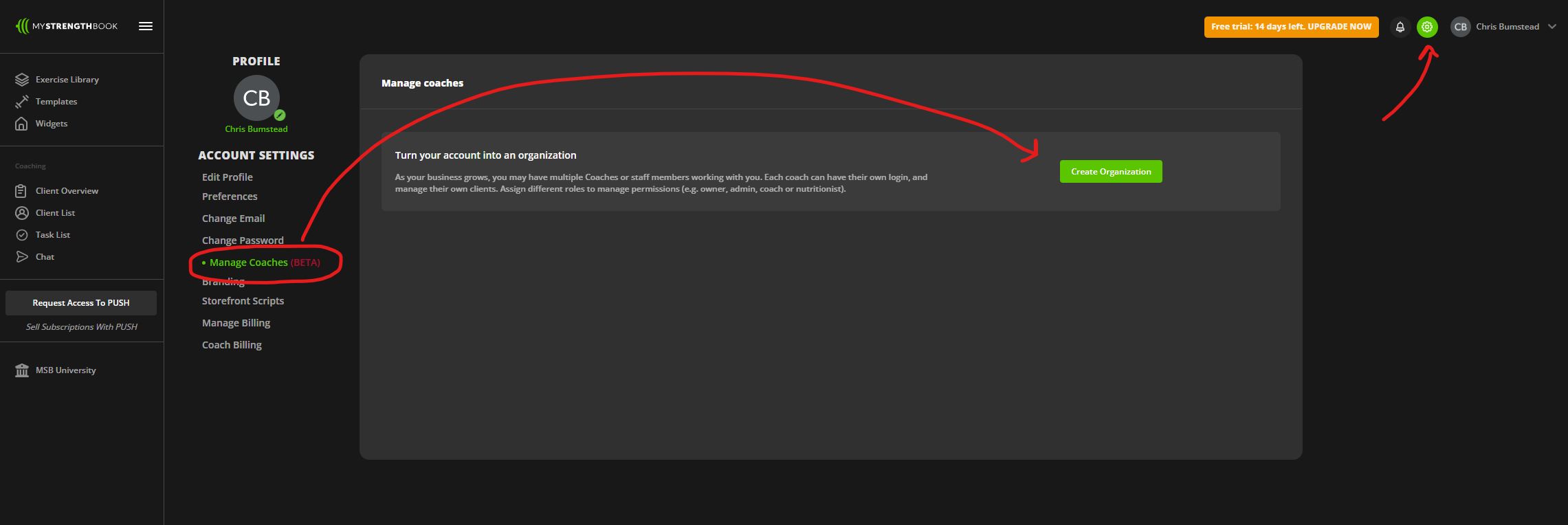
From inside your coaching account go to settings
Click on "Manage Coaches"
Click On "Create Organization"
Enter the password "ORG123"
Invite your new coach or any other staff members and assign their role/permissions
You can re-assign existing clients on your account to new coaches, or your new coaches can invite their clients to the account
Roles
Owner: This is your account. You can see all clients within the organization and have your own assigned clients. You can also invite admins
Admin: Can see all clients within the organization and have their own assigned clients. Can see all the subscription revenue (if applicable) and can invite other coaches to the organization
Coach: Can only see their assigned clients and invite their own clients
Nutritionist: Can modify and view nutrition plans for all clients within the organization, and have their own assigned clients
New Features
Permissions: For coaches and nutritionists, you can control permissions to what they see. For example, the master exercise library, templates or widgets, and if applicable PUSH (subscription data) and PRESS (gym membership data)
Group chats: Setup group chats with any number of coaches or clients within the organization
Re-assign clients: Under the client’s profile, you can re-assign a client from one coach to another
Technical issues
If your clients are having any issues, it might be that they are using an old version of the mobile app. Instruct them to install the latest update from the Appstore or Google Play
For any issues that you cannot troubleshoot:
Please send an email to info@mystrengthbook.com
Or, send a WhatsApp to Mike MacDonald @ 1-578-830-5036
FAQs
Q: I want to add a coach to my account but their email is already used on an active coaching account on MyStrengthBook. How can I still add them?
A: Only new accounts can be invited to an organization at the moment. Please email info@mystrengthbook.com for more help on this.
Q: I want to add a coach to my account but their email is already used on an inactive account on MyStrengthBook. How can I still add them?
A: Please email info@mystrengthbook.com for more help on this. We can remove the old account for you to make it available to be added to the organization
Support
Contact us
If you have any questions or want to share any feedback, feel free to email us at:


No email required
More from the blog




Your coaching deserves a smarter engine
Program, track, and analyze every client across training, nutrition, lifestyle, and education. Less admin, more coaching
Explore PULL ›